
|
1 2 3 4 5 6 7 8 9 10 11 12 13 14 15 16 17 18 19 20 21 22 23 24 25 26 27 28 29 30 31 32 33 34 35 36 37 38 39 40 41 42 43 44 45 46 47 48 49 50 51 52 53 54 55 56 |
/* Handle Action Events for AWT Button Example This java example shows how to handle action event of AWT Button by implementing ActionListener interface. */ import java.applet.Applet; import java.awt.Button; import java.awt.Graphics; import java.awt.event.ActionEvent; import java.awt.event.ActionListener; /* <applet code="HandleActionEventExample" width=200 height=200> </applet> */ public class HandleActionEventExample extends Applet implements ActionListener{ String actionMessage=""; public void init(){ //create Buttons Button Button1 = new Button("Ok"); Button Button2 = new Button("Cancel"); //add Buttons add(Button1); add(Button2); //set action listeners for buttons Button1.addActionListener(this); Button2.addActionListener(this); } public void paint(Graphics g){ g.drawString(actionMessage,10,50); } public void actionPerformed(ActionEvent ae){ /* * Get the action command using * String getActionCommand() method. */ String action = ae.getActionCommand(); if(action.equals("Ok")) actionMessage = "Ok Button Pressed"; else if(action.equals("Cancel")) actionMessage = "Cancel Button Pressed"; repaint(); } } |
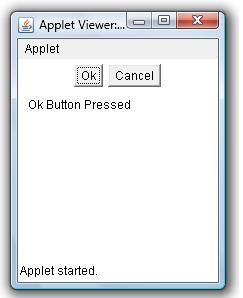
Example Output
Add Comment