
|
1 2 3 4 5 6 7 8 9 10 11 12 13 14 15 16 17 18 19 20 21 22 23 24 25 26 27 28 29 30 31 32 33 34 35 36 37 38 39 40 41 42 43 44 45 46 47 48 49 50 51 52 53 54 55 56 57 58 59 60 61 |
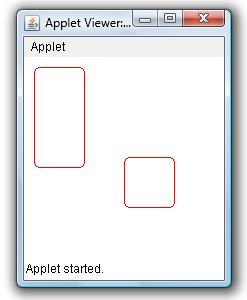
/* Draw Rounded Corner Rectangle & Square in Applet Window Example This java example shows how to draw rounded corner rectangles and squares in an applet window using drawRoundRect method of Graphics class. It also shows how to draw a filled rounded corner rectangles and squares using fillRoundRect method of Graphics class. */ /* <applet code="DrawRoundedRectExample" width=500 height=500> </applet> */ import java.applet.Applet; import java.awt.Color; import java.awt.Graphics; public class DrawRoundedRectExample extends Applet{ public void paint(Graphics g){ //set color to red setForeground(Color.red); /* * to draw a rounded corner rectangle in an applet window use, * void drawRoundRect(int x1,int y1, int width, int height, int arcWidth, int arcHeight) * method. * * This method draws a rounded corner rectangle of specified width and * height at (x1,y1) */ //this will draw a round cornered rectangle of width 50 & height 100 at (10,10) g.drawRoundRect(10,10,50,100,10,10); /* * If you speficy same width and height, the drawRoundRect method * will draw a round cornered square! */ //this will draw a round cornered square g.drawRoundRect(100,100,50,50,10,10); /* * To draw a filled round cornered rectangle or square use * fillRoundRect(int x1,int y1, int width, int height, int arcWidht, int arcHeight) * method of Graphics class. */ //set color to blue //setForeground(Color.blue); //draw filled rounded corner rectangle g.fillRoundRect(200,20,50,100,10,10); //draw filled square g.fillRoundRect(200,200,50,50,10,10); } } |
Example Output
thanks this very useful