
|
1 2 3 4 5 6 7 8 9 10 11 12 13 14 15 16 17 18 19 20 21 22 23 24 25 26 27 28 29 30 31 32 33 34 35 36 37 38 39 40 41 42 43 44 45 |
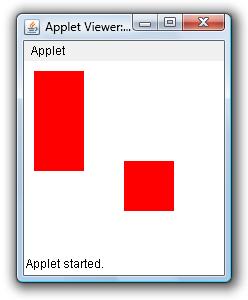
/* Fill Rectangle & Square in Applet Window Example This java example shows how to draw filled rectangles and squares in an applet window using fillRect method of Graphics class. */ /* <applet code="FilledRectangleExample" width=200 height=200> </applet> */ import java.applet.Applet; import java.awt.Color; import java.awt.Graphics; public class FilledRectangleExample extends Applet{ public void paint(Graphics g){ //set color to red setForeground(Color.red); /* * to draw a filled rectangle in an applet window use, * void fillRect(int x1,int y1, int width, int height) * method. * * This method draws a filled rectangle of specified width and * height at (x1,y1) */ //this will draw a filled rectangle of width 50 & height 100 at (10,10) g.fillRect(10,10,50,100); /* * If you speficy same width and height, the fillRect method * will draw a filled square! */ //this will draw a filled square g.fillRect(100,100,50,50); } } |
Example Output
I want to create one to six random number for snake and ladder game please send code in Java applet